How I Secure Self Hosted Services With Linux
SystemD, ACLs and bind mounts make it possible to secure just about anything.

Preface
I want to preface this by clarifying that I am not a security/cybersecurity expert. I consider myself reasonably intelligent and technical, but I haven’t worked professionally in the tech industry in some time so I only really have experience with the things I’ve bothered to go out and learn about for my own use cases. So while I hope you learn something from this, you should also seek out other, more qualified sources if you’re doing work for a company or government, as there may be legal requirements that I don’t cover here. This is mostly just a blog of anecdotes, personal choices and experiences.
Intro
Docker, LXC, Incus, snap packages, flatpaks, firejail, virtual machines. These are all methods used to contain applications on Linux machines. Linux operates with an assumption of least privilege. By default your normal user account is not root, and does not have the ability to modify the root filesystem, at least without further authentication using something like sudo. This minimizes the damage one user can do to only things they actually have the authority to modify, so mostly just their user account.
When it comes to running software, further containerization is almost always a good idea, especially if you’re running a server where other people might be accessing some service hosted on your machine. You have to assume that, intentionally or not, a service will be compromised at some point, or that it may crash and have some unexpected behavior, and when that happens, you’ll want to minimize the risk of that service affecting other services. A compromised Minecraft server shouldn’t be able to bring the whole server down, or expose information from other services.
Tools like Docker and snap can automate a lot of this. Docker images are containers that ship with their very own “images” of the application along with all of its dependencies, up to and including a minimal version of a full blown operating system if necessary. This allows a single Docker container/image to be used across different host operating systems, including Windows. If you’re hosting something that requires its own database, web frontend, etc., Docker can be used to automate the process of shipping all of those things in a single package pre-configured, instead of the user or administrator having to set up and secure their own database software, link the frontend application to it, etc. That’s why for things like Nextcloud, where several years ago doing things manually with a web archive was the recommended method, and is how I still do it because I haven’t had a reason to migrate, now that method is labeled as a “Community project” and the primary/official method of distribution is a Docker image. This allows them to ship the software, its webserver, database, cache, PHP, etc. all together as a single package, mostly pre-configured. Docker containers also containerize their application, effectively putting it in its own little sandbox where it can’t bother anything else without your permission.
SystemD for Security?
But this piece isn’t about Docker. While I do see the value in Docker, I’m also a home-lab enthusiast, and “for my purposes” I tend to stick to .deb packages or raw binary executables and then create my own solutions to containerize or lock them down. This allows me a bit more fine grain control over some things. I can make my own custom tweaks to secure dependencies that services depend on, and those dependencies, such as database software, can get their own security updates from upstream via my distribution package manager without having to update the whole software stack of services that depend on it. An update for MariaDB doesn’t mean I then also have to update or reinstall Nextcloud. In the case of Jellyfin this is especially true because Jellyfin hosts its own Debian package repository, so it can get its updates at the same time as all my other system updates without me having some second packaging system that I have to babysit.
SystemD is a very powerful tool for my setup because SystemD doesn’t just manage services, SystemD can also act as a quazi-container manager. SystemD has a slew of options that can be applied to services to restrict their access and permissions. As an example, I’ll use my Minecraft service, since Mojang only publishes a lone .jar file for hosting the Minecraft Java Edition server on Linux, so I’ve done quite a lot to containerize it. Here’s a screenshot of the SystemD service file I wrote for myself to manage my Minecraft server.
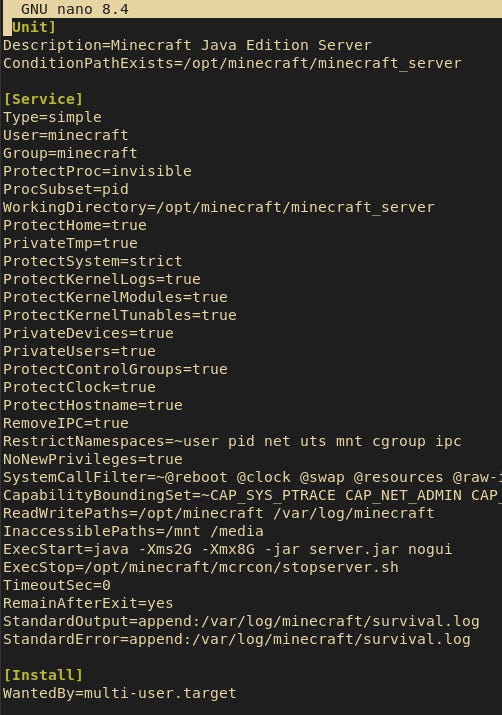
You can see several options listed here that don’t generally appear in most SystemD service files. Things like “PrivateTmp” give the service its own private /tmp directory separate from the real one used by the rest of the system. “ProtectProc” hides any processes running by users other than the one this service is running as, so in this case, any processes not running as the “minecraft” user will not be visible to the Minecraft service. The “SystemCallFilter” line restricts what system calls the executable is allowed to use (be careful with this and CapabilityBoundingSet, they can break things). You can read more about all of the directives you can put in SystemD unit files, and how they work at: https://man7.org/linux/man-pages/man5/systemd.exec.5.html
A side effect of many of these options is that SystemD will create a private, sandboxed root directory that the process then runs inside of. If a unit file contains directives that block access to certain files or folders, creates a private /tmp, etc., SystemD will create a private root namespace for that service in /proc/FOO , where FOO is the PID of the running service executable.
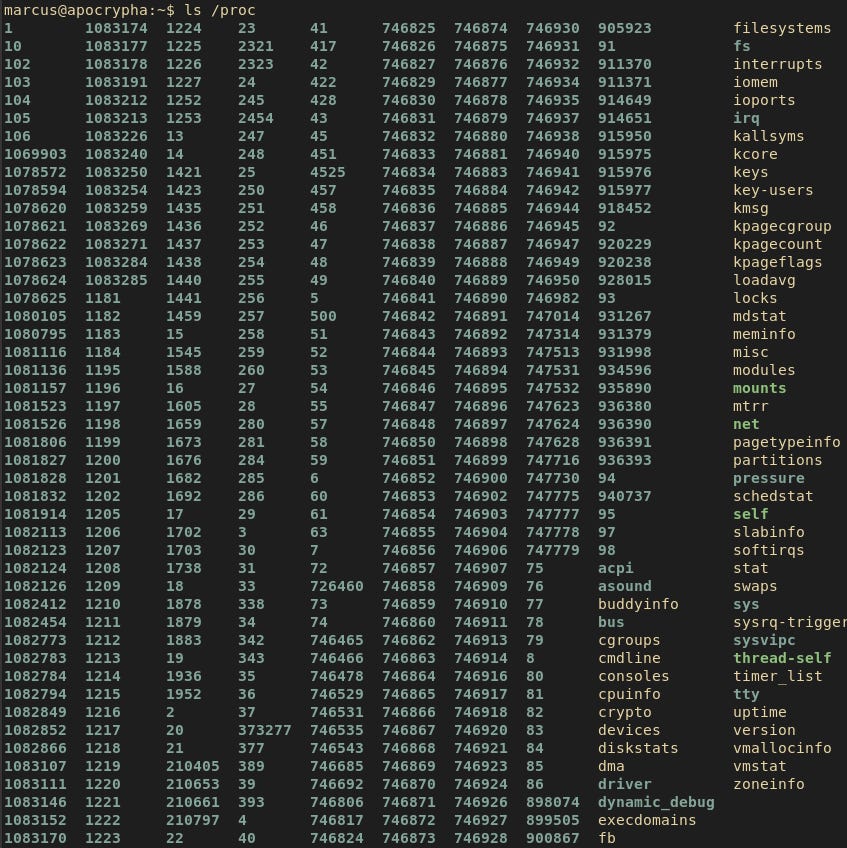
So in the example of my Minecraft server, the “Main PID” is: 1435
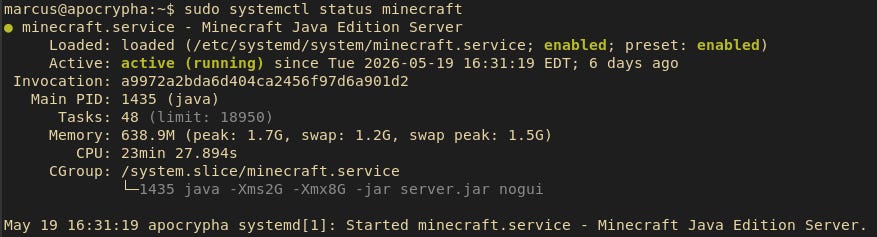
So if we look at /proc/1435/root, we’ll see a completely separate sandboxed root directory that, as far as the Minecraft service is concerned, is the real root directory.

There’s some big differences about this sandboxed root directory and the real one. Any protected directories are not mounted inside here, so the Minecraft service has no awareness that anything exists there. So for example, I have a 5 disk RAID array mounted at /mnt/storage, which is where all my bulk storage takes place; backups, media files, etc. However, if you look in those directories within the Minecraft sandboxed root environment, there’s nothing there.
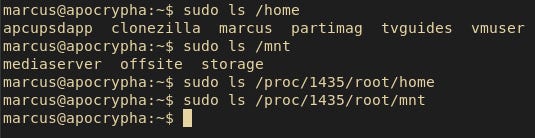
You’ll also notice in that SystemD service file that it runs Minecraft as the “minecraft” user. That’s because I want that service to have its own dedicated user with as few permissions as we can possibly give it, while still allowing the service to run. Running that service as some other, more privileged user, could allow the service to cause issues elsewhere. Well since I just downloaded a .jar file and not an install-able package, we need to make sure that the “minecraft” user actually exists. On Debian you can use the command:
sudo adduser —system USERNAME
This creates a “system” user account that is locked, has no password, no home directory and no default interactive shell. Users of this type can still be used to execute processes, such as when called by SystemD, and you can still run individual commands as them if you have sudo privileges with “sudo -u SOMEUSER SOMECOMMAND”, but they can’t be logged into interactively on their own. Here’s the current contents of /etc/passwd, and the passwd status output for my server’s “minecraft” user.

One other cool feature of SystemD is the “systemctl edit” command. In the case of my Jellyfin instance, for example, the .deb package ships with its own SystemD service file. Editing that service file directly might work temporarily, but it would get overwritten the next time Jellyfin updates. Instead, SystemD allows you to use the “edit” command to create drop-in files that get applied in addition to whatever is in the main service/unit file. For example, here’s the Jellyfin SystemD service file that ships as part of its .deb installer.
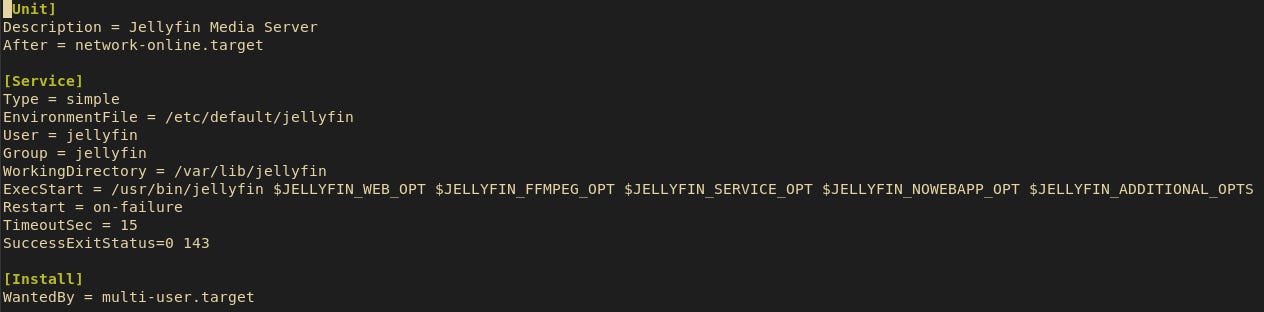
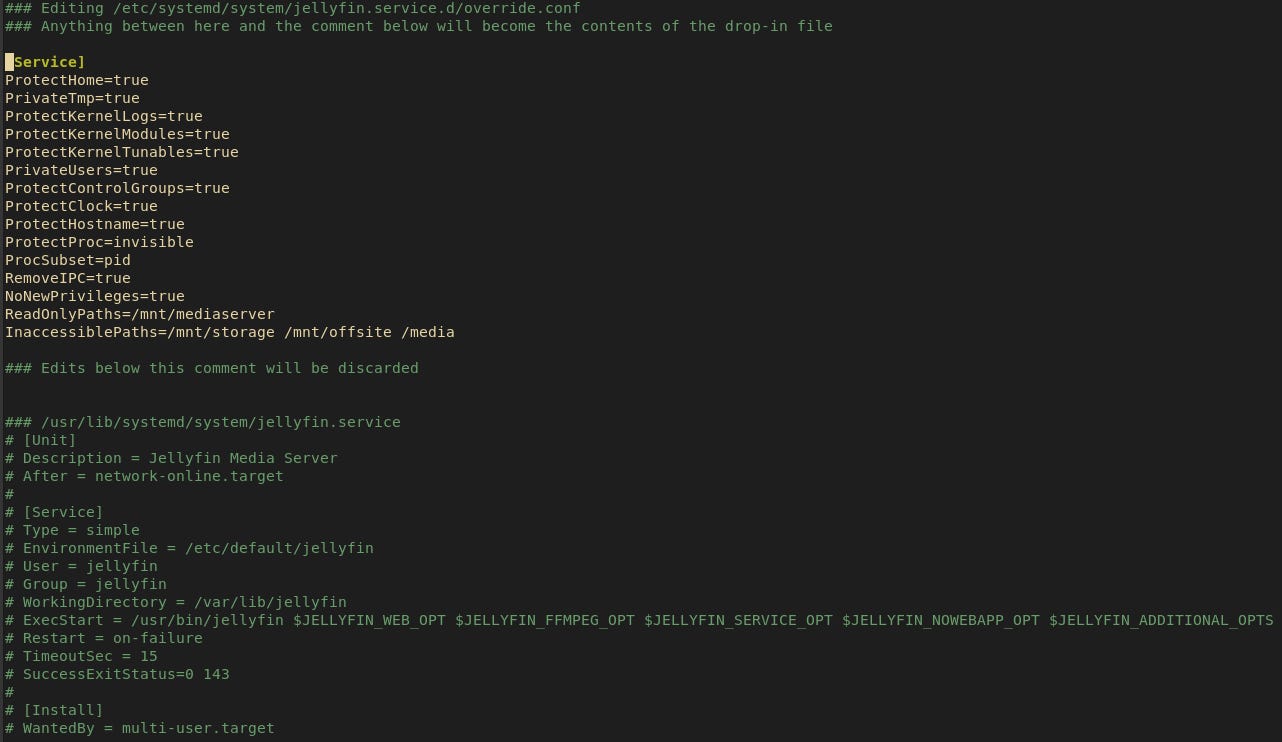
That’s pretty straight forward, and it works, but there’s not a lot in there as far as security goes, because they don’t know how your system is set up. It does create its own “jellyfin” user account with no interactive shell configured, but that’s about it. So instead, running “sudo systemctl edit jellyfin” opens nano (my default text editor) with a partially auto-populated file at:
/etc/systemd/system/jellyfin.service.d/override.conf
Here I can manually add extra options to control how the service operates, without having to worry about them getting overwritten the next time the package updates. These are applied at runtime in addition to anything in the base service/unit file. And if Jellyfin gets updated and its included service file gets overwritten, this drop-in file stays put and still gets applied after the update.
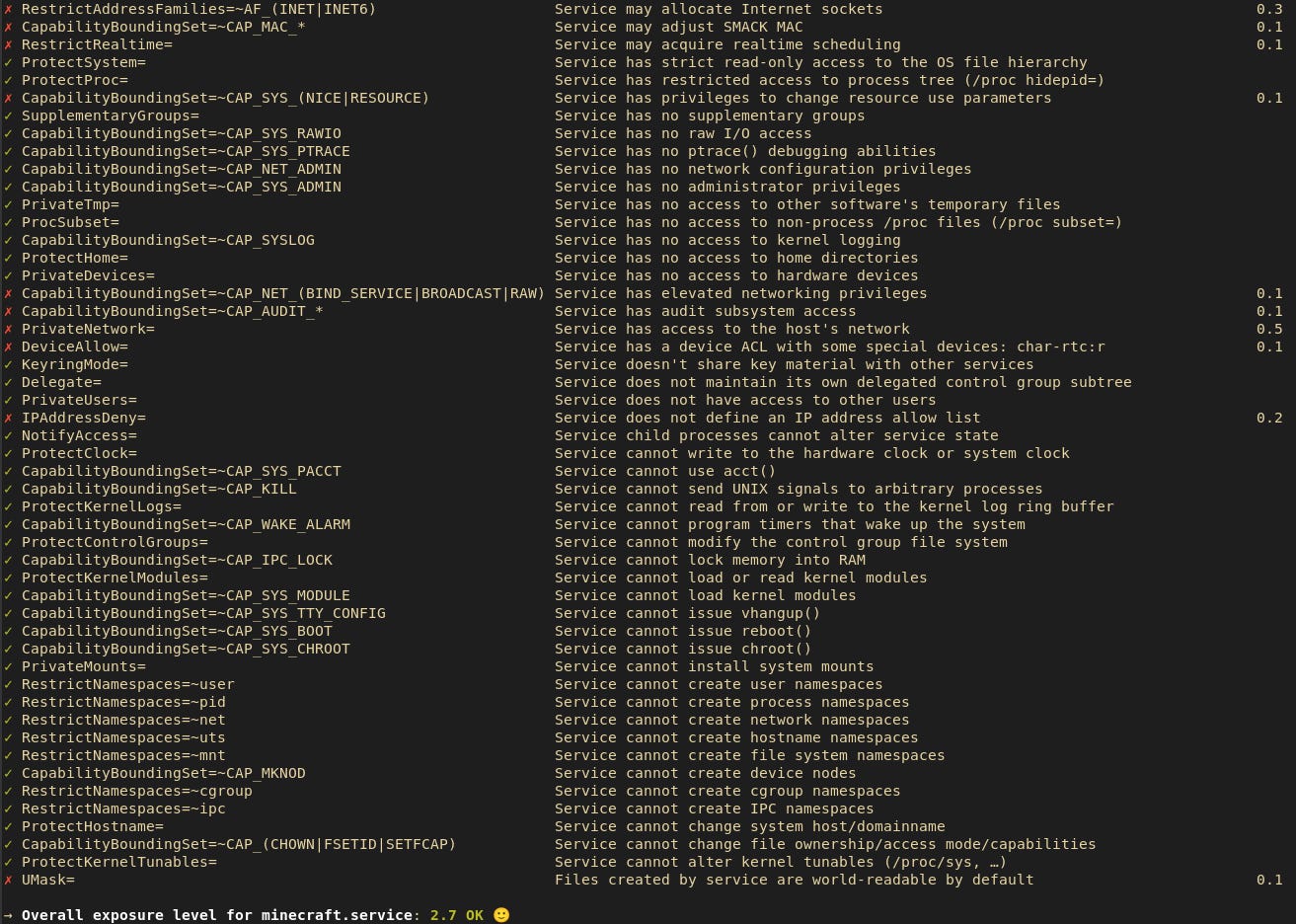
If you’re wondering what options to apply, or how your service stacks up security wise, besides the earlier documentation, SystemD also has a command that will analyze a service and give you a rating. Just run:
sudo systemd-analyze security SERVICENAME
The grading output in the last line or two seems pretty strict, and you’re never going to be able to get all green checkmarks on a service without completely breaking its ability to function. Services like Jellyfin or Minecraft, for example, must be allowed to communicate over the network; their core functionality depends on it. But you can use this command to get a lot of useful recommendations for security hardening options you can apply via SystemD.
ACLs for File Access Control
This brings me to the next topic, ACLs and bind mounts. ACL stands for “access control list”, and is just fancy permissions management. You can see in the screenshot above of my Jellyfin drop-in that I have “/mnt/storage” listed as an “InaccessiblePath”, even though that’s where my media folders for Jellyfin actually live. For this I think it’s easier to put my logic down in steps.
Jellyfin’s media lives on the RAID array at /mnt/storage, in its own subfolders.
Jellyfin should be able to see inside the folders where its media lives.
Jellyfin, and other untrusted service accounts such as Minecraft, should NOT be able to see anything else on /mnt/storage.
Applying a restrictive ACL to a higher level directory also affects all other subdirectories. So blocking access to /mnt/storage for a user blocks access to all subdirectories of /mnt/storage for those users.
Jellyfin should NOT be able to modify media, only read it for playback purposes.
Here are the steps I took to fulfill those requirements:
I created a group called “untrusted” and added jellyfin, minecraft and other custom service accounts to that group.
I used “sudo setfacl -m g:untrusted:000 /mnt/storage” to block any members of the “untrusted” group from accessing /mnt/storage at all.
I used “sudo setfacl -m u:jellyfin:rx SOMEFOLDER” to grant the Jellyfin user read only permissions to the media library folders in /mnt/storage.
I created a folder, /mnt/mediaserver, specifically to house some bind mounts for things like “movies”, “shows”, etc. I added bind and read-only mount commands to /etc/fstab so that, at boot, the appropriate media sources are mounted into their respective targets in /mnt/mediaserver . Jellyfin is configured to look at those folders in /mnt/mediaserver for its media. The “bind” option allows their own ACLs to pass thru to the mounted location, allowing Jellyfin to see into them, without having to modify any permissions on their real parent folder, /mnt/storage . The “read only” mount option prevents jellyfin, minecraft or any other user that manages to see inside /mnt/mediaserver , from being allowed to modify its contents. This is redundant as I already have the Jellyfin service restricted via its SystemD drop-in, but the read-only mount option is there as a “just in case”.

All these steps take Jellyfin way above and beyond its default security status. It places the Jellyfin service in its own sandboxed root directory while allowing it to see only what it needs to see on the storage array in order to function, without being able to modify it, and without being able to see anything else on the array.
Conclusion
Some other tools can accomplish a lot of these same goals in a more automated fashion. LXC containers, for example, are sort of like minimalist virtual machines that share the host’s kernel and don’t emulate virtual hardware, and so don’t have to go thru a full boot process. As a result, they’re much more lightweight than a full blown VM and start basically instantly while still allowing you to containerize whatever services you run inside them. The downside, however, is that it’s nearly an entire operating system, complete with its own set of libraries and component packages. That means that not only are you responsible for updates to the host OS, the application you’re hosting and all its dependencies, you’re now also responsible for keeping the virtual OS inside the container updated. Flatpak packages are good for securing desktop applications, but they’re less well suited for servers, especially if it’s headless. Canonical’s snap packages can run in a headless server environment, but you then have to install snap on your system in addition to your own system package manager, hope your application comes as a snap package, and Canonical have had their own controversies surrounding snap packages in the past. Docker is a purpose built tool for containing applications, but if you can’t or don’t want to use Docker for whatever reason, SystemD, ACLs and bind mounts can be incredibly powerful tools for securing and hardening services so that they can function without jeopardizing the stability or security of other services, or the system as a whole.
Donate
If you’d like to donate to me, you can either become a paid subscriber thru Substack, or you can use one of the following methods.
PayPal: https://paypal.me/gerowen
Bitcoin (BTC): bc1q86c5j7wvf6cw78tf8x3szxy5gnxg4gj8mw4sy2
Monero (XMR): 42ho3m9tJsobZwQDsFTk92ENdWAYk2zL8Qp42m7pKmfWE7jzei7Fwrs87MMXUTCVifjZZiStt3E7c5tmYa9qNxAf3MbY7rD